Manage your Goals in One Place
Goalscape's Visual Goal Management lets you see at a glance how you're doing and where to focus.

Let's talk about how to achieve goals in theory is really easy. We decide on a goal we figure out what we need to do to achieve it and then we do it but we all know it gets more complicated in reality. It is challenging to keep the overview and we have to make tough choices about what to do next and maybe more importantly what not to do at all. To help us in making these tough decisions. We have created Goalscape. It is as powerful as it is simple.
Unlike any other solution it always shows the big picture overview maximizing clarity about what to do next as well as boosting gold focused engagement. At the heart of Goalscape is a simple yet information-rich circular map that represents any Challenge in a unique holistic way. We call this map a Goalscape. It clearly shows each goal's position. It's priority and its progress status. So everybody always stays on top of things helping us to achieve our goals with olympic-level motivation Clarity and purpose.
And here's how it works in practice. In a Goalscape the main goal sits in the center surrounded by the sub-golds required to achieve it. Goalscape displays progress as darker shading filling up the gold slides from the outside in towards the main goal at the center the amount of shading represents the percentage complete for that goal. Goalscape shows the relative importance of each goal directly and intuitively the size of each goal represents its importance or in other words.
It's contribution to its parent to adjust the importance of a goal select it and drag the button on its outer border or use the important slider in its panel. Increasing the importance of one goal reduces the importance of all its neighbors and vice versa. In this way Goalscape serves as a friendly reminder that resources are limited and precious. And here are some navigation tips. To center a goal that would click on it or select the corresponding option from the context menu.
When you Center a sub goal a miniature of the main Goalscape appears highlighting the goal you centered. You can jump straight back to the main Goalscape view by double clicking on the miniature or right clicking on any goal and selecting Center on main goal. Up just one level at a time double click the central goal. To reduce the amount of detailed displayed and increase the clarity of your goal map. You can collapse some outer levels using the arrows at top right of the goal map.
You can start a new Goalscape from the home screen using either the create button at the top of the screen or the plus button at the bottom, right? The default Goalscape has a central main goal and three level one sub goals. You can change the name of the goals and add new ones at any level to create the visual hierarchy of gold that represents your challenge. Every goal has an information panel on the right hand side of the screen where you can define an update information like progress made.
Relative importances follow it a due date who is responsible tags for additional categorizations and notes that can include links images videos and tables. On the top left of the screen you can open the focus panel to filter and highlight specific goals that require attention at any given time. When you select any of the tags, the corresponding goals that contain these tags get highlighted and a list of these goals appears below.
Visualize

Visual Goal Management to track all your goals, subgoals and tasks in a single clear Big Picture map.
Prioritize

Having a Big Picture overview of your goals helps you focus on what matters now and what to do next.
Achieve

When you organize your projects in Goalscape, it supercharges your productivity, team alignment and success.
How Goalscape Works
Define, prioritize, track — plus the tools to keep your focus sharp and your team in sync.
Define Goals and Subgoals
Start with your top-level goal, then break it into subgoals and sub-subgoals until you have concrete actions.

Prioritize and Act
Set Importance on every goal so the visual size reflects what matters most. Use Now and Next tags to label goals for impact and urgency.

Track Progress and Frequently Review
Mark progress as you go — the entire structure updates live, rolling up from leaves to the central goal. Review weekly to adjust priorities with confidence.
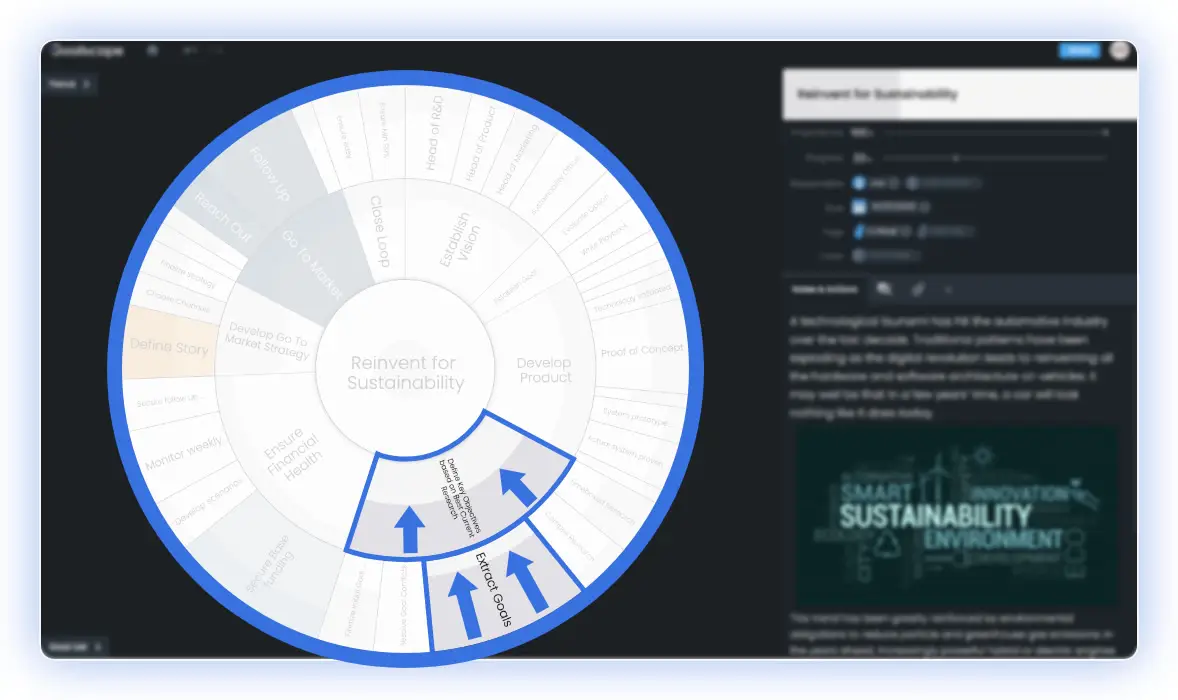
Notes, Tags, Attachments, Timescales
Insert Notes and Attachments in any format; set Timescales, assign Responsibility and add contextual Tags to your goals.
Apply color-coding for a quick visual way to associate goals in different areas.

Filter, List, Share, Collaborate
To achieve your long term goals you always need to know what to do right now.
Goalscape supports this essential Focus: use Now and Next tags, then filter your goals by Date, Progress, Responsibility and Tag — and generate Goal Lists.
When working in teams, share goalscapes to ensure goal alignment and collaborate with purpose — and run Goalscape natively inside Microsoft Teams where your team already works.

Comment on any Goal
In Goalscape you can comment on a goal and decide which of your collaborators is to receive an email notification about it.
And you do not have to decide on a subject for the email: the goal name IS the subject! And good subject lines help to avoid costly context switching.

Connect Goalscape to Claude
Goalscape now connects natively to Claude, Anthropic's AI assistant. With your permission, Claude can see your projects, break goals into subgoals, analyze progress, and mark tasks complete — working alongside you, in real time.
Built on the open MCP standard. You stay in the driver's seat — Claude only acts when you ask it to. See how to connect Goalscape to Claude →
